
Live · example event
- Checked in
- 412
- Sold online
- 368
- Walk-up taps
- 44
- Gate revenue
- $4,796
Real-time gate totals
Watch sales, check-ins, and revenue live during the event instead of counting a cash box after it.
If your tournament charges spectators at the gym door, parents can buy before tipoff and show a QR ticket on their phone. Volunteers scan at the door and take walk-ups by card, so nobody is counting a cash box after the last game.
Buy before tipoff · Scan at the door · Card walk-ups
Create the page, sell tickets, scan phones at the door. Three steps for your next event.
Your event gets a clean website page with ticket types, all-in pricing, and Stripe checkout. Share one link. No app for families to download.
Buyers get a QR code they can pull up from their phone. No account creation. No app download. Half the crowd is checked in before they arrive.
Volunteers scan from a phone browser, walk-ups pay by card with Tap to Pay on iPhone, and you leave with real totals.
These are real product screens shown with sample events, not a basketball customer’s results. The gate totals tile is an example event.
Watch sales, check-ins, and revenue live during the event instead of counting a cash box after it.
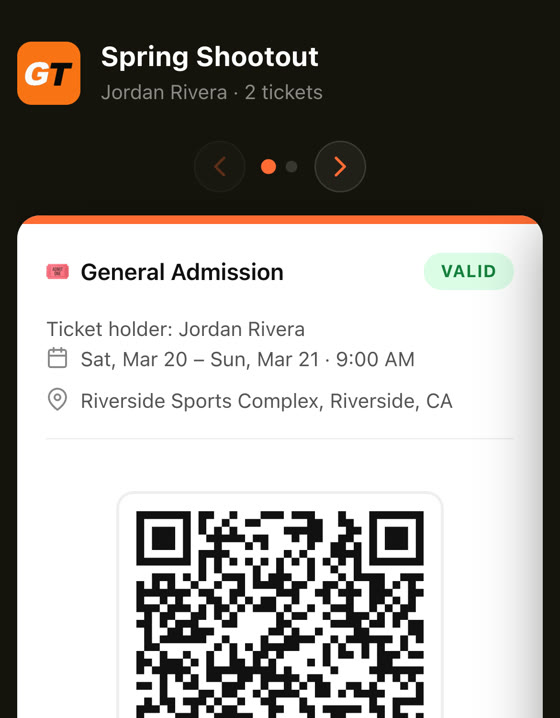
Sell online before game day. Tickets arrive by text and email as a QR code. No account, no app.

Any phone becomes the gate scanner from the browser. Volunteers are set up in minutes, no hardware to buy or charge.
Latecomers pay by card at the gate with Tap to Pay on iPhone, and the sale lands in the same record as everything else.
Issue refunds with a clean trail, and export attendee and sales data for taxes, reconciliation, and month-end close.
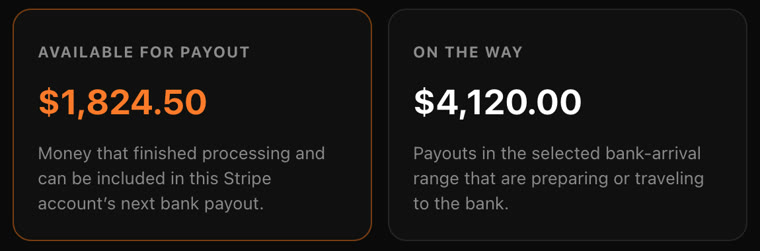
Ticket money lands in your own Stripe account, with a clear payout report. No spreadsheet cleanup for the board.
Set your ticket price, then choose who covers the fee: your fans or your organization. Fans always see the complete price upfront.
Fans see one complete price upfront. You keep the full $20.
No. Volunteers scan from their own phones in a web browser, and walk-ups pay by card with Tap to Pay on iPhone.
Yes. Walk-ups can pay by card at the door, and those sales show up with your online tickets in one record.
Yes. You set the ticket types and prices on your event page.
No setup fee and no monthly bill. Transaction fees apply when a ticket or payment is processed, and you choose whether fans or your organization cover the fee. The slider above shows the math for one ticket.
We set up your next event with you, walk your volunteers through the scanner, and get ready for the first gate together. The usual transaction fees apply to tickets sold.
Tell us about your event. We help you set it up, walk through the scanner, and get ready for the first gate.
Request a pilot →